Solving Chat Message Loss in Multi-Instance Environment
Problem Discovery
For the Kakao Tech Campus final project, I implemented team chat with WebSocket. Worked fine locally.
Then I deployed to AWS ECS, and once auto-scaling kicked in with 2+ instances, things got weird:
- Messages from User A weren’t reaching User B
- Some messages made it, some didn’t
Root Cause Analysis
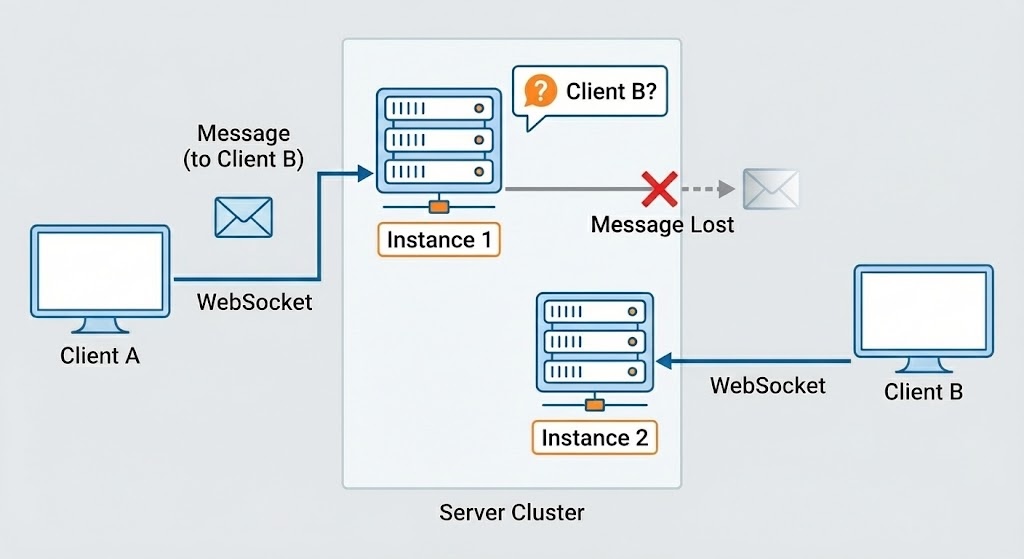
WebSocket connections are bound to a specific instance.
1
2
Client A → Connected to Instance 1
Client B → Connected to Instance 2
When Client A sends a message, it’s processed by Instance 1—but Client B is on Instance 2. Instance 1 has no idea where Client B is.
Choosing a Solution
I needed to sync messages across instances. I looked at a few options:
| Method | Pros | Cons |
|---|---|---|
| DB Polling | Easy to implement | Poor real-time, DB load |
| Kafka | Message persistence | Overkill for this scale |
| Redis Pub/Sub | Real-time, simple | No message persistence |
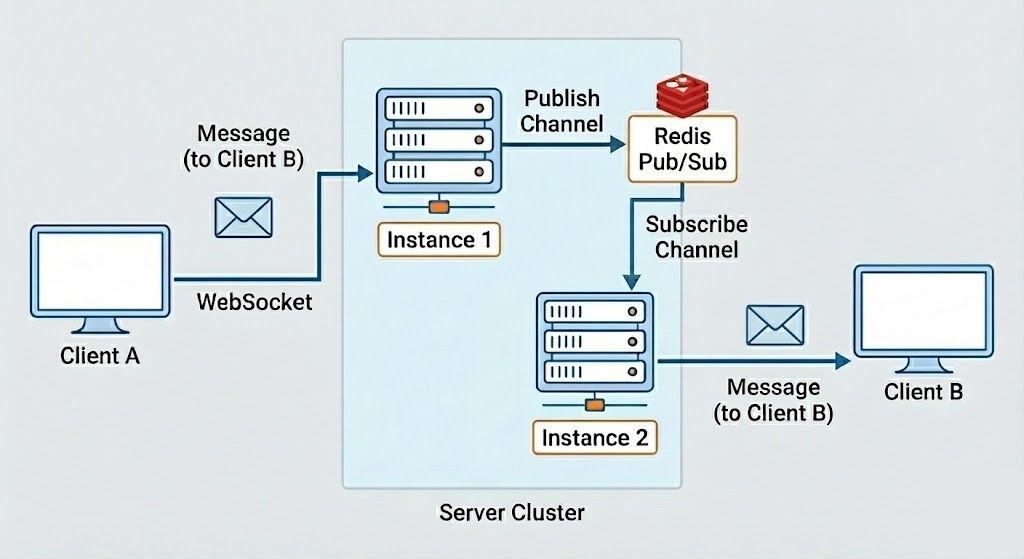
Since chat messages were also being stored in the DB, Pub/Sub’s lack of persistence wasn’t an issue. I went with Redis Pub/Sub.
Writing an ADR
To share this decision with the team, I wrote an ADR (Architecture Decision Record).
Key Decisions:
- Each ECS instance subscribes to a Redis channel
- Messages are published to the channel when they occur
- Redis delivers messages to all subscribed instances in real-time
- Sessions are managed per-instance; Redis is just the Pub/Sub broker
Risks:
- If Redis goes down, message delivery stops—chat goes down entirely
- If traffic spikes, Redis Pub/Sub could bottleneck
Verification: Load Testing with JMeter
Implementation alone wasn’t enough—I needed to verify that messages weren’t lost during actual auto-scaling.
On ALB + Fargate + ECS, I simulated 100 concurrent chat users with JMeter.
- Normal state: 100% message consistency with 2 instances
- Scale out: Traffic spike → scaled to 3 instances → new instance received messages correctly
- Scale in: Traffic drop → reduced instances → remaining instances worked fine
Lessons Learned
- Code that works on a single instance isn’t guaranteed to work in a distributed environment
- “It works” and “it works reliably” are different—verify under load
- Architecture decisions need justification—document it with ADR so you can explain later
From Kakao Tech Campus 3rd cohort final project (student schedule management service).