JPA N+1 Problem: From Root Cause to Solutions
JPA N+1 Problem: From Root Cause to Solutions
What Is the N+1 Problem?
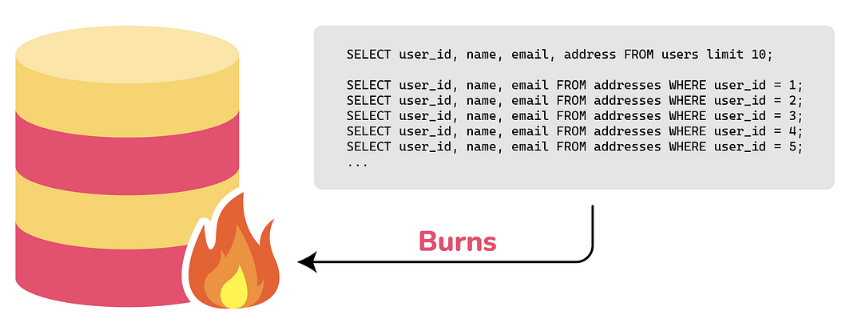
When you query entities with associations, you first run 1 query to fetch N entities—then N additional queries fire to load each entity’s related data.
Problem Situation
While migrating the Gift API from JDBC to JPA at Kakao Tech Campus, I hit the N+1 problem in the wishlist query feature.
Entity Structure
WishlistItemreferencesProductvia@ManyToOne(fetch = FetchType.LAZY)
Queries Fired
With 10 wishlist items:
- 1 query:
SELECT * FROM wishlist_item WHERE member_uuid = ? - 10 queries:
SELECT * FROM product WHERE id = ?(one per item)
11 queries total.
Comparing Solutions
1. Fetch Join
Use JOIN FETCH in JPQL to load related entities in one go.
1
2
@Query("SELECT w FROM WishlistItem w JOIN FETCH w.product WHERE w.member.uuid = :memberUuid")
List<WishlistItem> findByMemberUuidWithProduct(@Param("memberUuid") UUID memberUuid);
- Pros: Done in 1 query
- Cons: Can’t use with pagination; may cause cartesian product in many-to-many relations
2. EntityGraph
Use @EntityGraph(attributePaths = {"product"}) to specify what to fetch.
1
2
@EntityGraph(attributePaths = {"product"})
List<WishlistItem> findByMemberUuid(UUID memberUuid);
- Pros: Works with method-name-based queries
- Cons: Same limitations as Fetch Join
3. Batch Size
Set hibernate.default_batch_fetch_size to batch-load related entities using IN clauses.
1
spring.jpa.properties.hibernate.default_batch_fetch_size=100
- Pros: Works with pagination
- Cons: Query count is (N / batch_size) + 1, not truly a single query
Final Choice: EntityGraph
For this case, I went with EntityGraph.
Why:
- Wishlist queries return only one user’s items—not a lot of data
- Pagination wasn’t needed here
- I wanted to keep using Spring Data JPA’s method-name-based queries
Suitable Situations for Each Method
| Situation | Recommended |
|---|---|
| Associated entities without pagination | Fetch Join, EntityGraph |
| Pagination + associated entities | Batch Size |
| Collection relationships (OneToMany) | Batch Size |
| Single relationships (ManyToOne) | Fetch Join, EntityGraph |
Lessons Learned
- Lazy Loading’s trap:
FetchType.LAZYonly delays N+1—it doesn’t solve it. Queries still fire when you access related entities. - Log your queries: Without SQL logs in dev, N+1 is easy to miss. Count your queries.
- There’s no silver bullet: Fetch Join, EntityGraph, Batch Size each have trade-offs. Pick what fits.
From Kakao Tech Campus 3rd cohort Gift API clone coding (JDBC → JPA migration).
This post is licensed under CC BY 4.0 by the author.