Android Fragment Lifecycle and savedInstanceState Debugging
Problem
Back in high school, I built a convenience app called “Dongcheon Alimi” for my classmates. It displayed timetables, meal info, announcements, and more.
The screen layout was:
- 4 Fragments stacked on a FrameLayout
- Switched via show/hide using the Bottom Navigation Bar
Then a weird bug showed up. Whenever I briefly switched to another app and came back, all the hidden Fragments suddenly became visible.
Debugging Process
I spent 2 weeks on this.
- Went through the code line by line—nothing looked wrong
- Started wondering if it was a bug in the FragmentManager itself
- Even dug through English, Chinese, and Japanese documentation with translators
Root Cause Found
I finally found the answer in the Android developer docs.
“When temporarily switching from your app to another app and back, the system may destroy your application’s process.”
It was all about savedInstanceState.
When memory runs low, the system can kill background apps. At that point, Fragment state gets saved to savedInstanceState, but my custom show/hide logic was getting reset during this process.
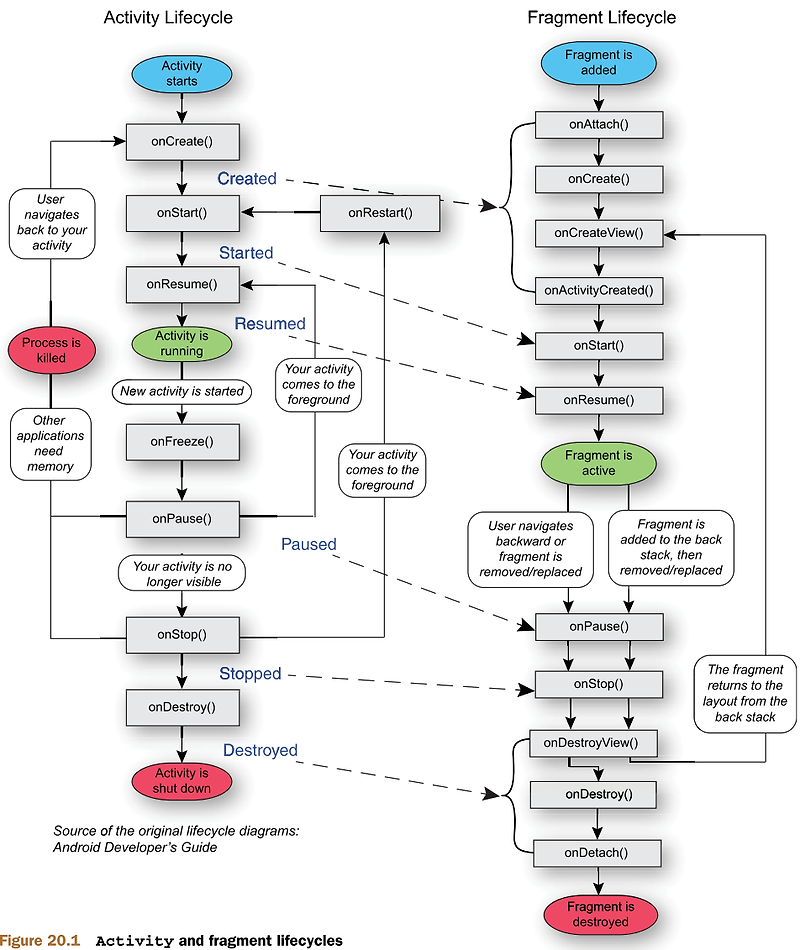
Solution
I added logic to save and restore Fragment state using savedInstanceState.
1
2
3
4
5
6
7
8
9
10
11
12
13
14
@Override
public void onSaveInstanceState(Bundle outState) {
    super.onSaveInstanceState(outState);
    outState.putInt("currentFragment", currentFragmentIndex);
}

@Override
protected void onCreate(Bundle savedInstanceState) {
    super.onCreate(savedInstanceState);
    if (savedInstanceState != null) {
        currentFragmentIndex = savedInstanceState.getInt("currentFragment", 0);
        // Show only that Fragment and hide the rest
    }
}
Lessons Learned
- Those 2 weeks of struggling turned into real experience and skill
- Bugs like this pop up when you don’t fully understand the Android lifecycle
- Before assuming “my code is fine,” check how the platform behaves first
- The official documentation is your best friend
From developing “Dongcheon Alimi” in high school. (Published on Play Store, promoted via student council, gained real users)